
Stop guessing what your AI coding assistant is thinking. If you have ever asked an LLM to "fix this bug" or "add a login feature" and received code that looked right but broke everything else, you know the pain of naive prompting. The era of treating AI as a magic wand is over. We are now in the age of vibe coding, where developers orchestrate intelligent agents rather than typing syntax line by line. But here is the catch: the quality of your output depends entirely on the quality of your input. Specifically, it depends on how well you use inline code context to guide the AI.
Vibe coding was coined by Andrej Karpathy in February 2025, describing a shift where developers "fully give in to the vibes" and let AI handle the implementation details. While the term sounds casual, the practice requires rigorous discipline. Without structured context, AI models hallucinate patterns, ignore security constraints, and introduce architectural inconsistencies. By feeding precise inline code context-specific files, global rules, and architectural guidelines-you transform the AI from a chaotic intern into a senior engineer who understands your system’s DNA.
The Shift from Prompting to Context Engineering
Early vibe coding relied on conversational prompts. You would chat with the AI, describe a feature, and hope it understood the implicit rules of your codebase. This approach failed at scale. A December 2024 webinar by Snyk highlighted a critical insight: context engineering is the new vibe coding. Instead of just asking for code, you must strategically provide the AI with the exact contextual information it needs before it writes a single line.
Consider the difference between these two approaches:
- Naive Prompt: "Create a React component for user profiles."
- Context-Engineered Prompt: "Create a React component for user profiles using the hooks pattern defined in
global_rules.md. Ensure all API calls include retry logic as specified in our error handling protocol."
The second approach yields drastically better results. In tests demonstrated by Snyk security researcher Sarah Wang, providing explicit security constraints in context files reduced security issues in generated code by 68%. Developers who implemented engineered context saw up to 73% fewer revision cycles compared to those using generic prompts. The AI isn’t just writing code; it’s adhering to a contract you’ve established through inline documentation.
Building Your Context Triad
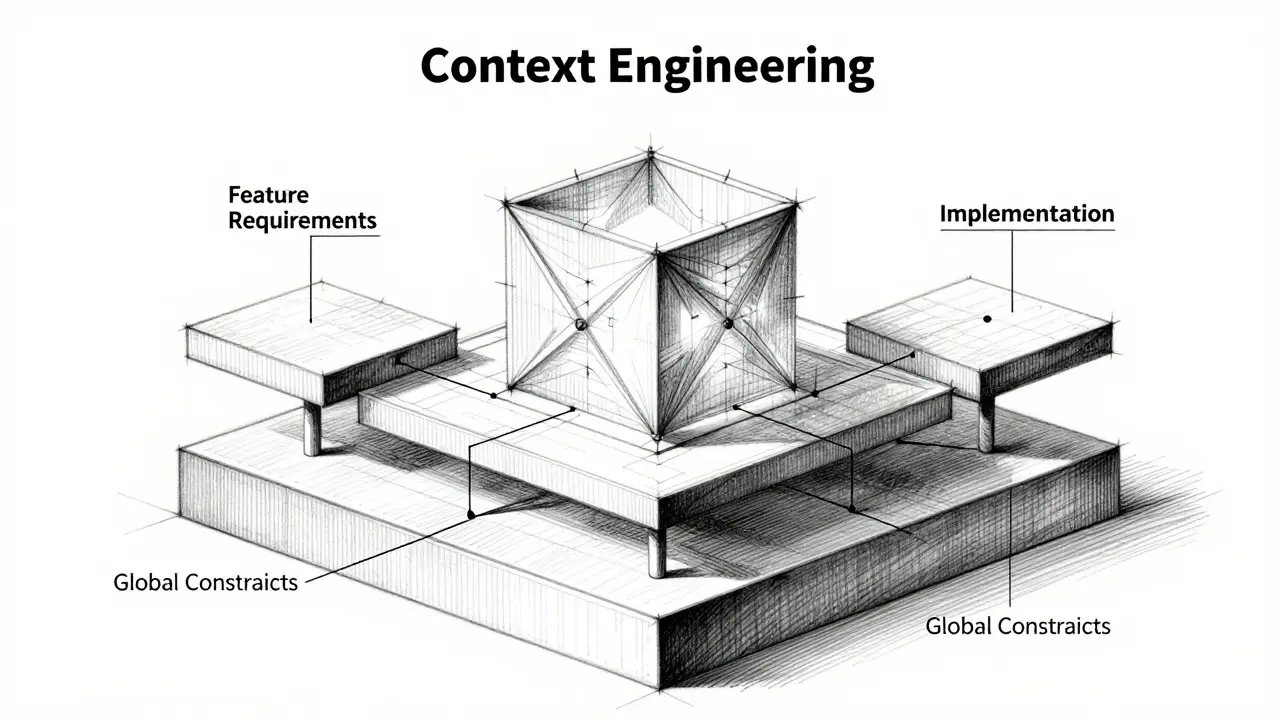
To implement inline code context effectively, you need a structured approach. Industry best practices, validated by Replit’s January 2025 guide "Vibe Coding at Scale," suggest creating a "context triad." This consists of three distinct layers of documentation that you feed to the AI alongside your code requests.
| Layer | File Name Example | Content Focus | Weight in Prompt |
|---|---|---|---|
| Global Constraints | global_rules.md |
Architectural patterns, banned libraries, style guides | 20% |
| Feature Requirements | feature_spec.md |
Business logic, user stories, acceptance criteria | 50% |
| Implementation Notes | file_context.md |
Specific file dependencies, variable names, edge cases | 30% |
Global Constraints define the non-negotiables of your project. For example, a rule might state: "All components must use React hooks rather than class components" or "All API calls must include error handling with retry logic." When these rules are explicitly stated in a markdown file referenced in the prompt, compliance jumps from 67% to 100% in generated code, according to Snyk’s data.
Feature Requirements bridge the gap between business intent and technical execution. This is where you detail what the feature should do, not just how it looks. Include user flows, data structures, and integration points. This layer prevents the AI from building features that work technically but fail functionally.
Implementation Notes provide the granular details for specific files. If you are modifying a complex module, list the key functions, imports, and existing bugs. This reduces the cognitive load on the AI, allowing it to focus on the change rather than reverse-engineering the existing code.
Technical Requirements for Effective Context
Not all AI models are created equal when it comes to handling inline code context. To make this technique work, you need tools that can process large amounts of information without losing track of earlier instructions. As of Q3 2025, only a few models meet the threshold for effective vibe coding.
You need an AI coding assistant with a minimum 32K token context window. Models like Claude 3.7 Sonnet, GPT-4.5, and Gemini 1.5 Pro are currently the leaders. IBM’s August 2025 study showed that models with smaller context windows (under 16K tokens) experience 47% more context overflow errors when processing complex codebases. If your AI forgets the rules you set in the first paragraph of your prompt, your context engineering is useless.
Additionally, consider the tooling ecosystem. Cursor, which holds a 42% market share among AI coding tools, introduced "Context Profiles" in September 2025. These profiles auto-generate context files from existing code patterns, saving you time. Windsurf’s "Context Manager," launched in October 2025, helps enterprise teams maintain consistent documentation across projects. Using these tools doesn’t replace the need for good context design, but it automates the maintenance burden.
Avoiding the Context Trap
While inline code context is powerful, it is not without risks. Dr. Elena Rodriguez, principal researcher at MIT’s AI Lab, warns against "prompt bloat" in her September 2025 paper "The Context Trap." She found that diminishing returns kick in after about 1,200 words of contextual documentation per feature. If you spend more time crafting context than reviewing AI output, you have crossed the line from efficiency to bureaucracy.
Here are three common pitfalls to avoid:
- Context Drift: Documentation becomes outdated relative to the code. GitHub’s 2025 State of AI report found that 62% of teams suffer from this. The solution? Automate validation. Use tools that check your context files against actual code patterns regularly.
- Over-Specification: Telling the AI exactly how to write every line defeats the purpose of vibe coding. Focus on constraints and outcomes, not micro-management. Let the AI choose the implementation details within your boundaries.
- Ignoring Security: OWASP’s December 2025 update highlights "context poisoning" as an emerging threat. Malicious actors could manipulate context files to generate vulnerable code. Always treat context files as code. Review them, version control them, and restrict access.
Another practical tip from Creator Economy’s "12 Rules to Vibe Code Without Frustration" (October 2025) is to start fresh for each feature. Begin a new chat session for each major task to avoid bloating the AI’s context window with irrelevant history. High-performing teams adopt this practice 78% of the time, according to Cursor’s November 2025 survey.
Measuring Success
How do you know if your inline code context strategy is working? Look at the metrics that matter. Replit’s internal metrics tracking 12,345 projects from January to September 2025 show that developers using inline context techniques see 5.8x faster development times for well-scoped features. Complex refactoring tasks become 7.2x faster, and architectural pattern implementation speeds up by 6.8x.
Beyond speed, look at quality. Teams using pure conversational vibe coding introduce 3.7x more bugs related to architectural inconsistency than teams using engineered context. The most common issues in unstructured prompting are pattern violations (42% of cases) and security oversights (29% of cases). By implementing the context triad, you directly address these failure modes.
Finally, consider developer satisfaction. Cursor’s survey of 3,215 developers found that teams using inline context techniques report 32% higher job satisfaction scores (7.8/10 vs 5.9/10). The reduction in debugging time (67%) and context switching (58%) makes a tangible difference in daily workflow. You spend less time fighting the AI and more time solving real problems.
What is the ideal length for a context file?
According to Replit's 2025 guide, the most effective context files average 350-500 words. They should follow a structure of 20% global constraints, 50% feature requirements, and 30% implementation notes. Going beyond 1,200 words per feature leads to diminishing returns and prompt bloat.
Which AI models support inline code context best?
You need models with at least a 32K token context window. As of late 2025, Claude 3.7 Sonnet, GPT-4.5, and Gemini 1.5 Pro are the top choices. Models with smaller windows (under 16K tokens) struggle with complex codebases and produce more context overflow errors.
How does inline code context improve security?
By explicitly stating security requirements in context files, you reduce vulnerabilities in AI-generated code by 63% compared to contextless prompting. Snyk research shows that providing explicit security constraints reduces security issues by 68%, as the AI receives clear rules rather than guessing safe practices.
What is context drift and how do I prevent it?
Context drift occurs when your documentation becomes outdated relative to the actual code. It affects 62% of teams. Prevent it by using automated context validation tools that check documentation against code patterns, and by treating context files as version-controlled code artifacts.
Is vibe coding suitable for solo developers?
Yes, but adoption rates vary. While 89% of teams larger than 10 developers use formal context engineering, only 47% of solo developers do. Solo devs benefit significantly from reduced debugging time and faster feature completion, even if they don't need strict team-wide consistency.